
A high quality DJ sound card is one of the most overlooked upgrades in a DJ setup. While controllers and software get most of the attention, the sound card is what actually processes and delivers your audio. A poor interface can lead to weak output, latency issues and unreliable performance in live environments.
Whether you are mixing at home, performing in clubs or producing tracks, choosing the right audio interface can significantly improve sound clarity and workflow. In this guide, we break down the best DJ sound cards in 2026, including real specifications, pricing and use cases.
A DJ sound card, also known as an audio interface, converts digital audio from your laptop into high quality analog sound that can be played through speakers or headphones. It also allows you to send multiple outputs, cue tracks and record mixes.
Unlike built in laptop audio, dedicated sound cards provide cleaner sound, better volume control and more reliable connections for professional use.
The Native Instruments Traktor Audio 6 remains one of the most widely used DJ sound cards. It is known for reliability and strong integration with Traktor software.
Key specs
Typical cost: £200 to £250
Best for: Digital DJs using Traktor and hybrid vinyl setups
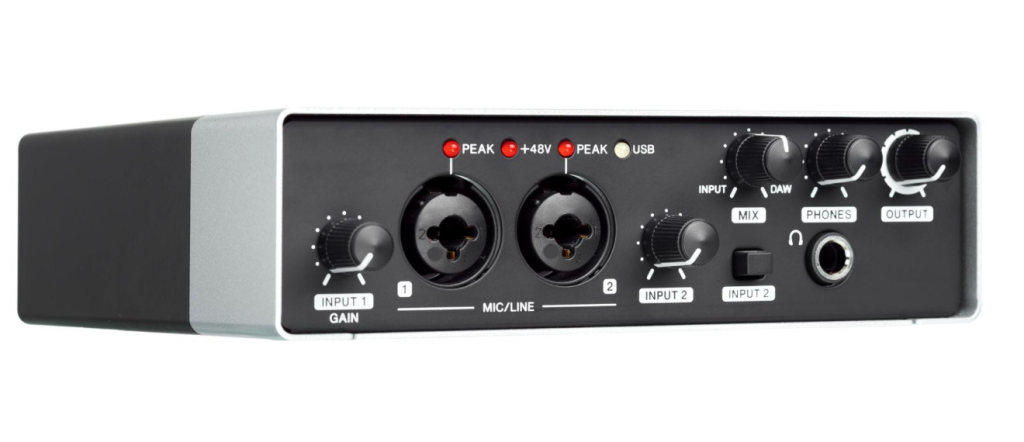
The Focusrite Scarlett 2i2 is one of the best selling audio interfaces globally. While not built specifically for DJs, it is widely used for home setups and streaming.
Key specs
Typical cost: £120 to £160
Best for: Beginner DJs, streaming and home studios
The Behringer UMC404HD offers excellent value with more inputs than most competitors in its price range.
Key specs
Typical cost: £90 to £130
Best for: Budget DJs and multi device setups
| Product | Inputs Outputs | Resolution | Best For | Price Range | Buy Now |
|---|---|---|---|---|---|
| Native Instruments Traktor Audio 6 | 6 in 6 out | 24 bit 96 kHz | Club DJs | £200 to £250 | Buy Now |
| Focusrite Scarlett 2i2 3rd Gen | 2 in 2 out | 24 bit 192 kHz | Beginners | £120 to £160 | Buy Now |
| Behringer U Phoria UMC404HD | 4 in 4 out | 24 bit 192 kHz | Budget setups | £90 to £130 | Buy Now |
Look for at least 24 bit audio. Higher sample rates like 96 kHz or 192 kHz provide better clarity and detail, especially in club environments.
More inputs allow you to connect turntables, microphones and external gear. Outputs are important for cueing and sending sound to different speakers.
Low latency is essential for DJing. A good sound card ensures that audio playback matches your actions in real time.
Metal housings and strong connectors are important if you plan to travel or perform regularly.
Make sure the interface works with your DJ software such as Traktor, Serato or Rekordbox.
Many beginner DJs rely on built in laptop audio, but this limits performance. A dedicated sound card provides:
For club DJs, this is not optional. It is a core part of a professional setup.
Basic interfaces like Behringer models. Suitable for home use and practice.
Better build quality and sound. Ideal for serious hobby DJs and small gigs.
High reliability, more outputs and better integration. Designed for club environments.
Choosing too few outputs
Many beginners underestimate how many outputs they need for cueing and mixing.
Ignoring latency specs
High latency can ruin a live performance.
Buying studio only interfaces
Some studio interfaces lack features needed for DJing such as multiple outputs.
Overpaying for unused features
If you only need two channels, a large interface may be unnecessary.
The Focusrite Scarlett 2i2 is one of the best options due to its simplicity, sound quality and affordability.
Most modern controllers have built in sound cards. However, external interfaces can improve sound quality and flexibility.
44.1 kHz is standard, but 96 kHz or higher provides better clarity in professional environments.
Yes, but it must have enough outputs for cueing and routing audio properly.
Latency is the delay between your action and the sound output. Low latency is critical for accurate mixing.
For professional DJs, yes. They provide better reliability, sound quality and performance under pressure.
This depends on your setup. Two inputs are enough for basic use, but more are needed for turntables and external gear.
Yes. They provide clearer, louder and more accurate sound than built in audio.
The best DJ sound card depends on your experience level and setup. For professional DJs, the Native Instruments Traktor Audio 6 remains a top choice. Beginners will find the Focusrite Scarlett 2i2 more than enough, while budget users can rely on the Behringer UMC404HD.
Choosing the right interface ensures better sound, smoother performance and a more professional setup.
Ready to upgrade your DJ setup and improve your sound quality?